
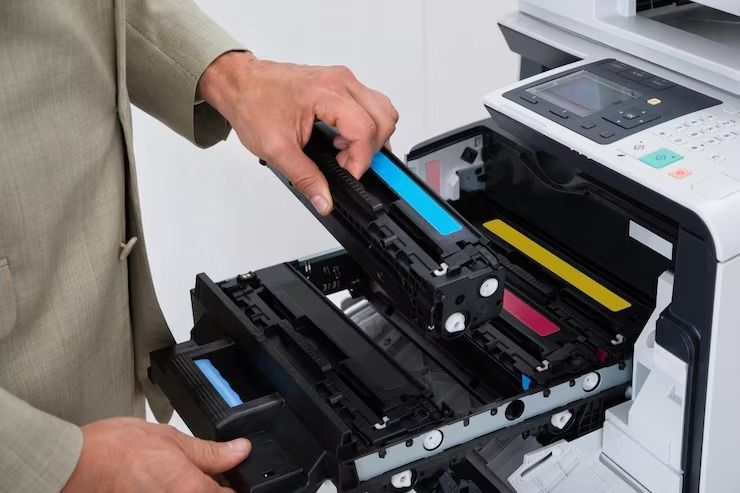
Quick answer: In a Brother laser printer, the toner cartridge holds the powder that forms your print, while the drum unit transfers that powder onto paper. Toner runs out often. One drum usually lasts through several toner cartridges, so you replace toner far more often than the drum.
If you own a Brother laser printer, you have probably seen two different warnings: Replace Toner and Replace Drum. Many people assume they are the same part, buy the wrong one, and end up with a printer that still won’t print. In most Brother models, the toner cartridge and the drum unit are two separate parts that click together. This guide is for home and small office users with Brother printers. It explains what each part does, how long each lasts, the signs it’s time to replace them, and how to avoid paying for a drum when all you need is toner.
What Is the Difference Between Brother Toner and a Drum Unit?
The toner cartridge is the supply. The drum unit is the tool that puts that supply on paper. In Brother’s own words, “the toner provides the powder that forms your print,” while the drum “transfers it precisely onto paper” using static electricity (Brother).
| Toner cartridge | Drum unit | |
|---|---|---|
| What it does | Holds the toner powder | Transfers toner onto paper |
| How it wears out | Runs empty as you print | The drum surface wears down over time |
| Typical lifespan | About 1,000–18,000 pages, depending on model | About 10,000–100,000 pages, depending on model |
| How often you replace it | Often | Occasionally |
| Example (Brother) | TN660, TN760 | DR630, DR730 |
Lifespan ranges are from Brother.
Why does Brother split them into two parts?
Because they wear out at very different speeds. If the drum were built into every toner cartridge, you would throw away a perfectly good drum each time the toner ran out. Keeping them separate means you only replace the part that is actually worn.
How Long Does a Brother Drum Last Compared to Toner?
A single drum usually lasts through several toner cartridges. Here is a real example using Brother’s own figures:
- The Brother TN660 high-yield toner prints about 2,600 pages.
- The Brother DR630 drum unit that works with it yields about 12,000 pages (Brother USA).
That means one DR630 drum can last through roughly four to five TN660 toner cartridges. Brother notes that drum yield is approximate and can vary by how you print. Printing lots of short, one-page jobs wears the drum faster than printing long documents in one go.
Which Brother toner goes with which drum?
Toner and drum models come in matched pairs. A few common ones:
| Toner | Drum | Example printers |
|---|---|---|
| TN630 / TN660 | DR630 | HL-L2340DW, HL-L2380DW, MFC-L2700DW, DCP-L2540DW |
| TN730 / TN760 | DR730 | HL-L2350DW, HL-L2370DW, MFC-L2710DW, DCP-L2550DW |
Always check the model code printed on your current toner and drum before ordering.
How Do You Know Whether to Replace the Toner or the Drum?
Start with the message on the printer, then check the print quality.
Replace the toner when:
- The printer says “Toner Low,” “Replace Toner” or “Toner Ended.”
- Prints look faded or light across the whole page.
- Shaking the cartridge gently gives you a few more pages, then the fading returns.
Replace the drum when:
- The printer says “Drum End Soon” or “Replace Drum.”
- The same marks, dots or streaks repeat on every page.
- Ghost images or spots stay even after you install new toner.
These drum signs come straight from Brother’s guide. If you replaced the toner and the problem didn’t go away, the drum is the likely cause.
What if the drum is new but the warning won’t go away?
The printer counts pages to estimate drum life. After installing a new drum, you often need to reset that counter, or the “Replace Drum” message stays on. Brother models use different button steps, so follow the guide for your drum:
Only reset the counter after you’ve installed a new drum. Resetting an old, worn drum hides the warning but won’t fix the print quality.
For other print problems, such as paper jams or blank pages, this printer troubleshooting guide covers the common fixes.
How Do You Install a New Brother Toner Cartridge?
On most Brother mono laser printers, the steps are the same:
- Open the front cover and pull out the drum and toner assembly together.
- Push down the green lock lever and lift the old toner cartridge out of the drum.
- Unpack the new toner and gently rock it side to side to spread the powder evenly.
- Click the new toner into the drum until the lever locks.
- Slide the green tab on the drum left and right a few times to clean the corona wire.
- Put the assembly back in and close the cover.
Step 5 is often skipped, but a dirty corona wire can cause vertical lines that look like a drum problem.
How Can You Save Money on Brother Toner and Drums?
- Don’t replace the drum early. Swap only the toner unless you see drum warnings or repeating marks.
- Choose high-yield toner. The TN660 and TN760 hold more toner than the standard TN630 and TN730, which usually means a lower cost per page. See this comparison of high-yield vs standard-yield toner.
- Consider compatible cartridges. Quality brother toner cartridges from a compatible brand can cost much less than the brand-name version. Look for ISO-certified manufacturing and a solid warranty. For example, there’s a compatible Brother TN660 toner and a Brother TN760 toner.
- Keep a spare. If you print every day, a spare cartridge or a TN660 2-pack saves you from paying rush prices when the toner runs out mid-week. Here are more reasons to stock up on toner.
Conclusion
The toner cartridge and the drum unit do two different jobs, and they wear out at very different speeds. Toner runs out often and is the part you’ll buy most. The drum lasts through several cartridges and only needs replacing when you see a drum warning or repeating marks on every page. Match the right toner to the right drum, reset the drum counter only after installing a new drum, and choose high-yield toner cartridges to keep your printing costs down.
Frequently Asked Questions
1. What is the difference between Brother toner and drum?
The toner cartridge holds the powder that forms your print. The drum unit transfers that powder onto the paper using static electricity.
2. Do I need to replace the drum every time I replace the toner?
No. One drum usually lasts through several toner cartridges. Replace it only when the printer shows a drum warning or prints repeat marks.
3. How long does a Brother DR630 drum last?
Brother rates the DR630 at about 12,000 pages. Actual life depends on how you print.
4. Which drum works with the Brother TN660?
The TN660 works with the DR630 drum unit.
5. Which drum works with the Brother TN760?
The TN760 works with the DR730 drum unit.
6. Why does my Brother printer say “Replace Drum” after I installed a new one?
The drum counter needs to be reset. Follow the reset steps for your drum model after installing the new drum.
7. How can I tell if streaks are caused by the drum or the toner?
If the same marks repeat on every page and stay after you install new toner, the drum is the likely cause. Faded prints across the whole page usually mean low toner.
8. Are compatible Brother toner cartridges safe to use?
Yes, if they come from a reputable maker with ISO-certified manufacturing and a warranty. Match the exact model number, such as TN660 or TN760.